When people ask me what made me decide to automate my homelab cluster, they expect a story about frustration — some late night where everything broke and I snapped. That’s not what happened.
The first time I built a bare metal Kubernetes cluster manually, it took me a week and countless hours. Manual steps, configuration files, troubleshooting, and learning. And when it was done, I looked at it and thought: the next evolution of this is automation. Not because I was tired of doing it manually — but because I wanted to be able to reproduce it at a moment’s notice.
That idea became Kubernetes The Homelab Way.
What It Is
Kubernetes The Homelab Way is a public repo that takes you from bare metal hardware to a fully running Kubernetes cluster with a push of a button. We’re talking:
- OS preparation and kernel configuration
- containerd runtime installation and configuration
- kubeadm, kubelet, kubectl installation — always fetching the latest stable version dynamically
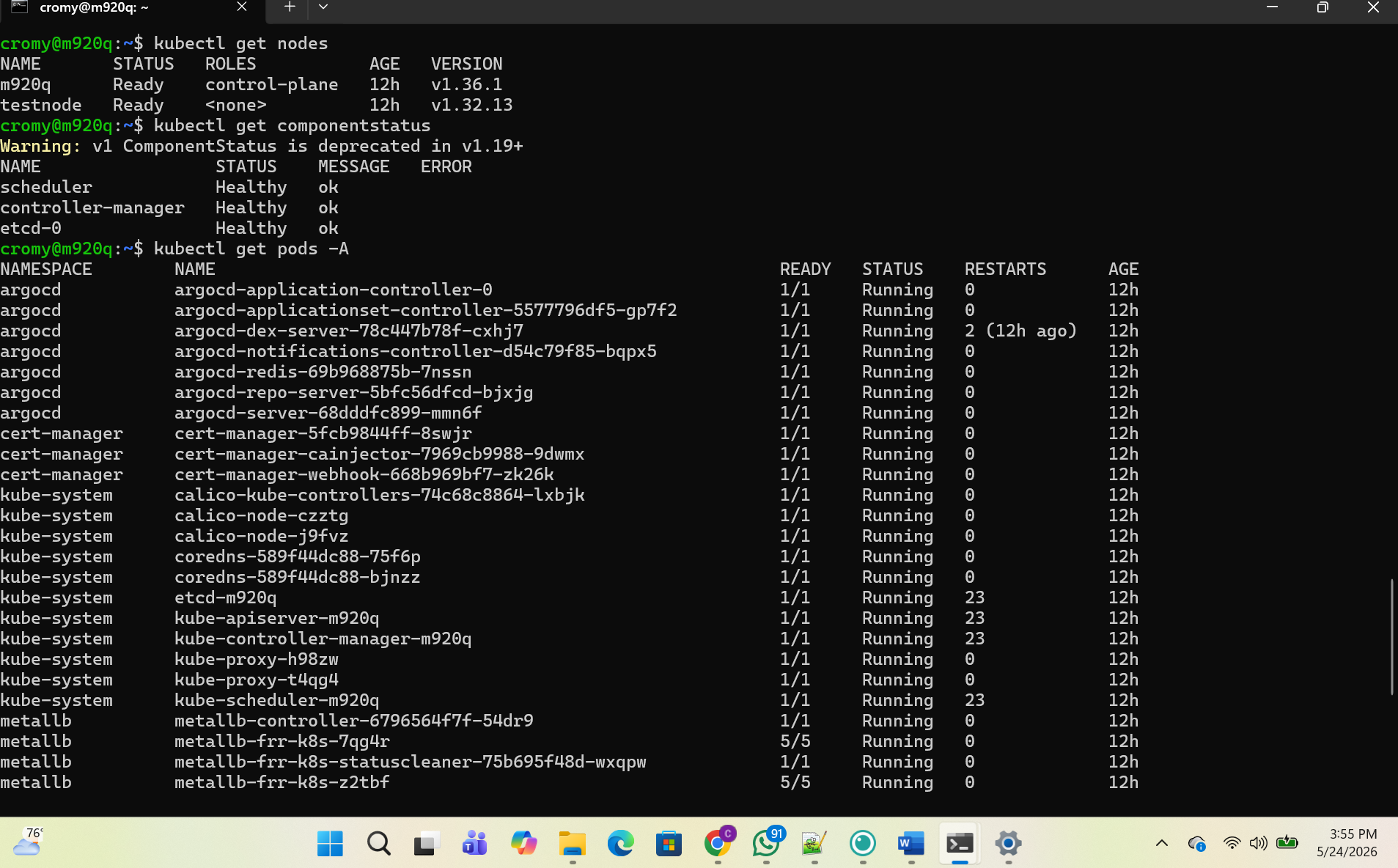
- Cluster initialization with Calico CNI
- Worker node join and multi-master HA support
- Full stack deployment: MetalLB, Nginx Ingress, cert-manager, Sealed Secrets, ArgoCD
- Observability: Prometheus, Grafana, Loki, Promtail
What took me a week now takes about 30 minutes. Conservatively.
And here’s the part I’m proud of: it always fetches the latest version of both Kubernetes and Ubuntu. You could run this today or a year from now and you will always be working with current, supported software. No hardcoded versions going stale. Every component is deployed via Helm charts fetching the latest stable releases — you’re never working with outdated configurations.
How It Works
If you handed me a brand new x86_64 machine still in the box, here’s exactly what happens:
- Clone the repo
- Update your inventory file — hostname, IP address, network interface. That’s it.
- Run
ansible-playbook site.yml
The automation handles everything from there. It preps the OS, installs containerd so pods can communicate, installs the Kubernetes tooling, initializes the control plane, joins your worker nodes and additional control plane nodes for HA, and deploys the full stack. By the time it’s done you have a production-grade cluster with GitOps, load balancing, TLS certificate management, and full observability — running on hardware you own.
The Gap Between CKA and Production
There’s a conversation that doesn’t happen enough in the Kubernetes community: the gap between passing the CKA and actually operating production Kubernetes.
The CKA teaches you Kubernetes conceptually. It teaches you kubectl commands. It gives you a mental model of how the pieces fit together. That’s valuable — I passed it and it shaped how I think.
But operating production Kubernetes is different. How it’s deployed depends on the company. What’s running on it depends on the team. The tooling around it — GitOps, service mesh, observability, secrets management — none of that is on the exam.
This repo bridges that gap. It exposes you to the full operational picture: not just the cluster but everything that makes a cluster production-worthy. You see how ArgoCD manages deployments. You see how cert-manager issues TLS certificates automatically. You see how Prometheus and Grafana give you visibility into what’s happening. That operational intuition is what separates someone who passed a cert from someone who can run infrastructure.
The Hardest Bug
There were a lot of bugs. I ran test after test — at one point the same validation failed 15 times in a single night before it finally passed. Each failure revealed another edge case in how components interact.
But the one that took the longest was the Calico/Tailscale conflict.
Here’s the thing about Kubernetes: every component in your cluster needs to know the IP addresses of every other component. Those IPs need to be stable. If you don’t assign static IPs, addresses can change and break the cluster.
I use Tailscale — a private VPN service that assigns permanent IPs to all my nodes regardless of what network they’re on. It’s what lets my cluster survive moving apartments. But Calico, the CNI plugin that handles pod networking, was auto-detecting Tailscale’s virtual interface instead of the actual ethernet interface. That caused a conflict at the networking layer that took multiple iterations to solve correctly.
The fix once we understood the root cause:
IP_AUTODETECTION_METHOD=skip-interface=tailscale.*
Tell Calico to use any interface except Tailscale’s. Hardware agnostic. Works on any x86_64 machine regardless of what the ethernet interface is named. Not everyone will use Tailscale. But for my use case it was essential, and now it’s baked in as a conditional fix that only runs when Tailscale is detected.
Why Bare Metal?
There’s a question I get asked: why not just use EKS or GKE?
Managed services make sense for production businesses — you’re not paying engineers to babysit control planes. But for someone filling in foundational gaps, managed services abstract away exactly what I needed to learn.
When EKS provisions a cluster, you don’t see how the control plane comes together. You don’t see CNI plugin behavior. The abstraction that makes managed services powerful is the same abstraction that hides the learning.
Both have their place. I just know where I am in my journey and what I needed to get to the next level.
How to Use It
All you need is a spare x86_64 machine — any spare machine. Old laptop, mini PC, whatever’s catching dust. The automation installs everything. There’s documentation. Honestly just bring patience, maybe some coffee, and a couple of spare machines and you’ll have a working cluster.
The one thing you’ll need to customize is your inventory file: hostname, IP address, network interface name. That’s the only machine-specific configuration. Everything else is handled.
Why I’m Sharing It
A year ago I didn’t know any of this. I was figuring out Kubernetes one error message at a time. I have connections in the industry. I know people who are exactly where I was 12 months ago.
This is a letter to them. And to anyone else who wants to build something real instead of clicking through a managed service.
Kelsey Hightower shared Kubernetes The Hard Way for free. A lot of people in this community share their work for free. That spirit is why I’m here. Someone contributed something that helped me — this is my way of contributing back.
If this saves someone a week of manual work, it was worth building.
What Surprised Me
I thought I’d say the technical complexity surprised me. Or the number of bugs. Or how long debugging took.
But what actually surprised me most is that I did it. I followed through. There’s a particular kind of beauty in seeing something that lived only in your mind become something that’s alive — running on hardware in your apartment, deploying workloads, accepting traffic. It’s there. It’s doing its job.
And the other thing that surprised me is the person I’m becoming. A year ago my Kubernetes skills were light. I was learning what a pod was. Now I’m the person building this, documenting it, and sharing it with the community. That’s not the same person. The journey isn’t done — but that transformation is real.
What also surprised me is how much fun I’m having. This doesn’t feel like work. And I say that knowing it can blur the line between my actual job and my hobby — because this cluster is going to need maintenance, upgrades, and attention on a regular basis. That’s a real commitment. But somehow that doesn’t feel like a burden. It feels like exactly where I want to be spending my time.
Repo: github.com/BeyondTheCert/Kubernetes-The-Homelab-Way
Blog: beyondthecert.dev
If you build something with it, let me know. If you find a bug, open an issue. If this helped you, share it with someone who needs it.