If you’re building a bare metal Kubernetes cluster with Calico and you’ve also installed Tailscale for remote access — read this before you spend hours debugging pod networking.
I didn’t. I spent the hours. Here’s what I learned.
The Setup
Four nodes. Two ThinkPad T480s as control plane. Two ThinkCentre M720q desktops as workers. I installed Tailscale on every node so the cluster stays reachable across apartment moves — Tailscale IPs don’t change even when your home network does.
Stack: kubeadm, Calico v3.29, Tailscale, Ubuntu Server 24.04.
What Broke
Workers joined the cluster fine. Then things got weird.
Pods on master could reach the API server. Pods on workers couldn’t. Every connection to 10.96.0.1:443 — the ClusterIP for the API server — timed out. MetalLB kept crashing. Same error, over and over.
The workloads weren’t the problem. The nodes were.
BGP — What It Is and Why It Matters Here
Calico uses BGP internally to tell nodes where pods live. Each node manages a range of pod IPs and advertises that range to every other node. That’s how a pod on master knows to route traffic through worker1 to reach a pod living there.
For BGP to work, each node registers a peering address — the IP that other nodes send routing updates to. Calico picks this automatically by scanning your network interfaces.
That auto-detection is where things went wrong.
The Conflict
When you install Tailscale on a Linux machine it creates a virtual interface called tailscale0. From the OS perspective it looks like any other network interface — same as your ethernet port, just virtual.
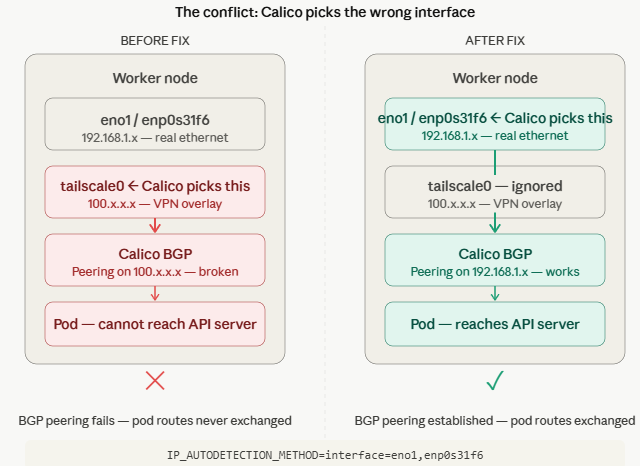
Calico scanned my interfaces, saw tailscale0, and chose it over the actual ethernet interfaces. Every node ended up registering a Tailscale IP as its BGP peering address instead of its real ethernet IP.
The problem: BGP peering over Tailscale doesn’t work. Tailscale is an encrypted overlay VPN — it doesn’t carry routing protocols. The BGP sessions never came up. Pod routes were never exchanged. Workers had no idea where anything lived.
That’s the whole story. MetalLB runs as a pod on a worker. Worker pods can’t reach the API server. MetalLB crashes. Repeat.
The Fix
Two commands. Both matter.
Step 1 — Tell Calico which interfaces to use:
kubectl set env daemonset/calico-node -n kube-system \
  IP_AUTODETECTION_METHOD=interface=eno1,enp0s31f6
eno1 is the NIC name on the ThinkCentres. enp0s31f6 is the NIC name on the ThinkPads. The pipe-separated list tells Calico to use whichever one exists on the current node. This fixes future restarts.
Step 2 — Fix the wrong addresses already in Calico’s datastore:
calicoctl patch node worker1 \
  --patch='{"spec":{"bgp":{"ipv4Address":"<worker1-ethernet-ip>/24"}}}'

calicoctl patch node worker2 \
  --patch='{"spec":{"bgp":{"ipv4Address":"<worker2-ethernet-ip>/24"}}}'
Replace <worker1-ethernet-ip> and <worker2-ethernet-ip> with the actual ethernet IPs of your worker nodes. Run ip addr show on each node if you’re not sure.
Step 1 alone isn’t enough. The wrong addresses are already registered. You have to correct them in the datastore or Calico keeps peering over Tailscale on the next restart.
After both steps Calico re-established BGP over ethernet. Pod routes came back. MetalLB stopped crashing.
What to Remember
If you’re running Calico and Tailscale on the same nodes — set IP_AUTODETECTION_METHOD before you join your workers. Don’t wait for things to break.
Calico sees tailscale0 as a valid interface. Without explicit guidance it may choose it. On some machines it will. On others it won’t. It depends on interface ordering and your specific hardware.
Don’t leave it to chance.