I passed the CKA in January after four attempts. It taught me how to use Kubernetes. But understanding how the pieces actually fit together — that comes from building it yourself.
The CKA taught me how to deploy pods, manage services, troubleshoot containers. Mumshad’s KodeKloud course covered the architecture — the API server, etcd, scheduler, controller-manager, kubelet. But KTHW makes you build those connections yourself: generating the certificates that secure communication between components, creating the kubeconfig files that authenticate them to each other, manually starting each service and seeing how they register.
That’s why I’m doing Kubernetes the Hard Way.
If you’ve been in the Kubernetes space long enough, you’ve heard of it. Created by Kelsey Hightower, it’s a guide to building a Kubernetes cluster from scratch — no managed services, no automation, no shortcuts. You provision VMs, generate TLS certificates for every component, configure SSH access, bootstrap etcd, and manually wire together the control plane and worker nodes.
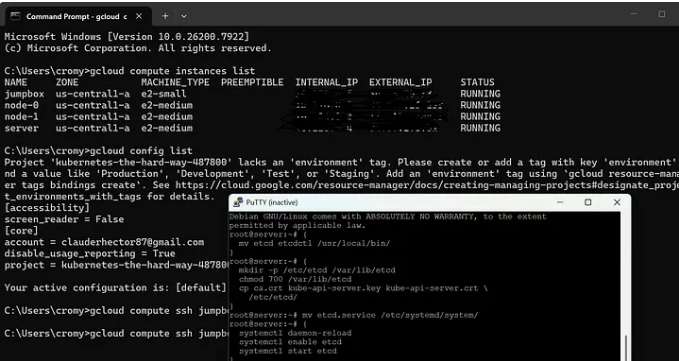
Two weeks in, I’m 7 of 12 sections complete. I’ve provisioned four VMs on Google Cloud, set up a jumpbox, distributed SSH keys across machines, generated certificates for the API server, kubelet, kube-proxy, and every other component, created kubeconfig files for authentication, configured data encryption at rest, and bootstrapped etcd.
And honestly? It felt like I was just running commands from a tutorial.
Copy a command. Paste it. Press enter. Repeat. I wasn’t inventing solutions or designing architecture — I was following a script. And that felt hollow. Like I wasn’t really learning, just executing someone else’s instructions.
But the tutorial isn’t the teacher. The bugs are.
Six Problems
Section 03 was supposed to be straightforward. It wasn’t.
Not because the commands were complex, but because several things broke in ways the tutorial didn’t account for. Every problem forced me to dig into SSH configurations, file permissions, and cloud provider defaults.
Problem 1: ssh-copy-id failed for root
GCP disables root login by default, and root has no password, so the command failed silently. Fix: SSH as my GCP user, then use sudo to manually write the jumpbox’s public key into /root/.ssh/authorized_keys on each machine.
This taught me that cloud providers lock down root access for security. Understanding why root login is disabled matters more than just knowing the workaround.
Problem 2: GCP private key not on jumpbox
GCP’s private key only existed on my Windows machine, not the jumpbox. Fix: Copy the key from Windows to the jumpbox using gcloud compute scp, then set correct permissions with chmod 600.
SSH keys are local to the machine that generated them. If you need to SSH from Machine A to Machine B, Machine A needs the private key.
Problem 3: PermitRootLogin still set to no
I ran the sed command to change PermitRootLogin no to yes. The command returned successfully. Root SSH still didn’t work. GCP’s Debian image has a different sshd_config format than the tutorial expected.
Lesson: Config files vary by OS and cloud provider. Don’t assume tutorial commands work verbatim everywhere. Always verify after every change.
Problem 4: authorized_keys missing on node-0 and node-1
The SSH key distribution worked for server but failed silently for node-0 and node-1. Those nodes were missing the /root/.ssh/ directory entirely. I had to create it manually with mkdir -p before copying the key.
Silent failures are the hardest to debug. Check the basics: Does the target directory exist? Do file permissions allow writes?
Problem 5: hostname –fqdn returned the wrong hostname
GCP automatically adds its own hostname entries to /etc/hosts with a comment “Added by Google.” These entries took priority over mine. I had to remove GCP’s entries and add my own with the correct FQDN format.
Cloud providers inject their own configuration into VMs. You have to identify and override those defaults. This is the kind of thing managed Kubernetes services handle invisibly — but when you’re building from scratch, you see every layer.
Problem 6: Kubeconfigs missing from server after scp
I ran the scp command to copy kubeconfig files from the jumpbox to the server machine. The command completed without errors. The files weren’t there. Ran it again. They showed up.
Sometimes commands fail silently over SSH. Network hiccups, permission issues, timing problems. Always verify after every step. Trust, but verify.
What I Actually Learned
The tutorial gives you the commands. The bugs teach you why they matter.
Each problem taught me something different — SSH authentication, file permissions, config files, cloud provider quirks, and why you need to verify everything.
These are operations fundamentals that managed Kubernetes services hide from you. You never think about SSH keys or hostname resolution because the platform handles it. That’s great for productivity. But it means you never learn what’s actually happening under the hood.
KTHW teaches you this by making you fix it yourself. No GUI. No automated error recovery. No “undo” button. If something breaks, you dig into logs, check file permissions, read config files, and figure it out.
The Groundwork
Right now, I’m in the groundwork phase. Sections 1–7 focus on infrastructure setup — provisioning VMs, configuring SSH, generating certificates, bootstrapping etcd. It’s easy to feel like you’re just running commands without understanding why.
But this groundwork is what managed services hide from you.
When you spin up a GKE cluster, Google handles:
- Certificate generation for every component
- Kubeconfig creation and distribution
- etcd bootstrapping and high availability
- SSH key management
- Hostname resolution and DNS
You never see it. You just get a working cluster.
KTHW makes you do all of that manually, so when something breaks — and it will — you know where to look.
What’s Next
The infrastructure is in place — certificates, kubeconfig files, etcd running. Next up: the control plane, then worker nodes, then networking.
Because passing the CKA taught me how to use Kubernetes. KTHW is teaching me how it works.
That’s the progression: certification → internals → operations.
If You’re Doing KTHW
If you’re working through Kubernetes the Hard Way and feeling like you’re “just running commands,” you’re not alone. That’s the point.
The tutorial is the script. The bugs are the teacher.
Stick with it. The groundwork pays off when you start configuring actual Kubernetes components and see how all these certificates, kubeconfig files, and hostnames actually get used.