Claude R. Hector | beyondthecert.dev | August 2026
The Learning Path
The plan was deliberate:
- Pass CKA (January 2026) — Understand Kubernetes conceptually
- Kubernetes the Hard Way (March 2026) — Build it from scratch, understand each component and the internals
- Bare-metal cluster (April 2026) — Operate real infrastructure, not labs
After CKA and KTHW, building a homelab cluster made sense. I saw people like Mischa van den Burg building clusters on old hardware as homelabs. That inspired me to try my own approach.
The Hardware Decision
I considered building on Raspberry Pis or ARM architecture. Cheaper, smaller, cooler hobbyist appeal.
Then I realized the debugging problem: if something broke, I wouldn’t know if it was a Kubernetes issue or an ARM-specific issue. Networking fails — is it Calico, or ARM kernel incompatibility? Pod crashes — is it the scheduler, or ARM driver? You can’t isolate the learning.
So I chose x86_64 bare metal. Standard architecture. Enterprise-standard. If something broke, it was the infrastructure layer I needed to understand, not a hardware compatibility issue.
This forced clarity: every problem was a legitimate Kubernetes or infrastructure problem, not a “special case” problem.
The Genesis1 Foundation
With the hardware decision made, I built Genesis1 — a four-node bare metal cluster on spare x86_64 machines in my apartment. It worked. It became production-like. I ran real workloads on it.
Then I hit the walls.
The Limitations of Bare Metal
A bare metal cluster is exactly what you think it is: hardware, directly. No abstraction. No hypervisor layer. If something breaks on the physical machine, the cluster feels it immediately.
That’s a feature when you’re learning. You feel every layer. But it’s also a ceiling.
The CPU and RAM are finite. Genesis1 had what it had. I designed the cluster first, then had to retrofit workloads to fit its constraints. I couldn’t just spin up a new node when I needed capacity. I was limited by the spare hardware I had sitting around.
The isolation was nonexistent. If I wanted to experiment with a new technology stack, I couldn’t isolate it. Everything ran on the same bare metal. If an experiment crashed a node, it could cascade.
The expansion path was unclear. Adding nodes meant finding more hardware, building more infrastructure, managing more physical machines. Genesis1 taught me Kubernetes, but it couldn’t teach me infrastructure at scale.
I needed something else.
The Exodus Vision
Exodus was born from a simple question: what if the layer beneath Kubernetes wasn’t bare metal, but virtualization?
I wanted to introduce a hypervisor layer between hardware and Kubernetes. This separation of concerns would let me think about provisioning, configuration, and orchestration as distinct problems.
Proxmox became my hypervisor. Terraform became my VM provisioning tool. Ansible remained the layer where I install and configure Kubernetes.
This separation was intentional. I wanted to learn:
- How hypervisor abstraction works
- How Kubernetes runs on managed infrastructure
- How to orchestrate across both layers
- How infrastructure scales
Genesis1 taught me Kubernetes. Exodus was meant to teach me everything above and below it.
The Build Sequence
The order matters. Here’s how Exodus came together:
Phase 1: Hypervisor Setup
- Install Proxmox VE 8.4 on each physical node (three Lenovo ThinkCentres, later expanded to four)
- Join all nodes into a Proxmox cluster
- Result: one unified resource pool (CPU, RAM, storage) across the cluster
Phase 2: VM Provisioning
- Create Ubuntu cloud image templates on each node
- Use Terraform to provision virtual machines (dev, prod, observability, tooling, CKS-prep clusters)
- Each VM gets a static IP, SSH key, and hostname via cloud-init
- Time savings: an hour of clicking versus minutes of
terraform apply
Phase 3: Kubernetes Clusters
- Install RKE2 on each VM using Ansible
- Bootstrap control planes first
- Join workers to their clusters
- Result: six independent RKE2 clusters (local, tooling, dev, prod, observability, CKS-prep)
Phase 4: Cluster Management
- Install Rancher on the local cluster (management plane)
- Import all other clusters as downstream
- Result: one pane of glass managing six clusters
Phase 5: Platform Services
- NFS provisioner (persistent storage)
- cert-manager (TLS automation)
- Gitea (internal Git repo)
- ArgoCD (GitOps sync engine)
- Jenkins (CI/CD orchestration)
- Vault (secrets management)
- Harbor (container registry)
- Prometheus + Grafana (observability)
This wasn’t random. Each layer built on the previous one. Each decision was deliberate — choosing tools that would scale and work together.
Why Terraform (Not Crisis-Driven)
People often ask: what broke that made you switch to Terraform?
Nothing broke. That’s the honest answer.
Manual VM provisioning in the Proxmox UI took about 5–6 minutes per machine. A dozen machines meant an hour of clicking, waiting for cloud-init, verifying IPs. It wasn’t broken. It was just slow.
Terraform made sense because:
- Speed. All the VMs in minutes, not an hour
- Reproducibility. Same code, same result, every time
- GitOps readiness. The Terraform code lives in Git, becomes the source of truth
- Scalability. Need more VMs? Change one number in the code
It wasn’t a panic fix. It was the natural next step.
The Real Constraint
Four days later, the cluster was running. Six clusters operational. Full tooling stack deployed.
Then the RAM wall hit.
Across the nodes, I had roughly 94GB total at the time. By mid-July, I was running at:
- Node 1: 88% memory used
- Node 2: 97% memory used
- Node 3: 97% memory used
The cluster became unstable. Pods were evicting. The system was thrashing.
The honest part: I miscalculated. I thought the available RAM would carry me through Phase 1. I didn’t account for the mini VMs (etcd, apiserver, kubelet instances across six clusters). Each cluster needs its own infrastructure overhead.
So I waited for RAM upgrades.
88% complete meant: everything working, but constrained. Phase 2 (adding Backstage) was blocked until the RAM arrived. That’s not a failure. That’s what real infrastructure constraints look like.
Running Real Workloads
This matters: I’m not running toy applications.
I’m running:
- Immich — my Apple Photos backup, using Postgres on NFS
- n8n — workflow automation pulling Oura Ring and Apple Health data nightly
- Prometheus + Grafana — full observability stack
- ArgoCD — syncing manifests from Gitea to clusters
- Jenkins — orchestrating infrastructure changes
These aren’t “hello world” apps. They have state. They need persistent storage. They integrate with each other. They fail in interesting ways.
This is why the RAM pressure mattered. These workloads are real. The constraints are real.
The Architecture That Emerges
What’s interesting is how the architecture naturally evolved:
- Separation of concerns: Proxmox layer (provisioning) → Platform layer (orchestration)
- Multi-cluster federation: Rancher managing six downstream clusters
- GitOps orchestration: Jenkins webhook triggers Terraform + Ansible
- Secrets management: Vault with Kubernetes auth
- Persistent storage: NFS provisioner with unified StorageClass
- Observability: central Prometheus + Grafana
This wasn’t planned upfront. It emerged from building systems that need to scale and stay maintainable.
Who Is This For
Genesis1 was for me to learn Kubernetes. Exodus is different.
It’s for anyone interested in:
- How to build multi-cluster Kubernetes infrastructure
- How hypervisor and orchestration interact
- How to scale from “a cluster works” to “we manage six clusters”
- How real infrastructure constraints show up
The Surprising Part
You’d think something would have broken. It did — repeatedly, and in instructive ways.
A hardware-level NIC driver bug (e1000e) caused nodes to silently drop off the network at random intervals, traced down to kernel logs and fixed with a targeted Ansible playbook disabling specific offload features across the fleet.
A DNS misconfiguration baked into the VM provisioning template — nodes defaulting to a broken upstream resolver — caused Rancher’s cluster agents to intermittently disconnect across multiple clusters, requiring a fix at the actual symlink and netplan level, not just a surface patch.
A single node’s disk filled completely, triggering write failures on the VMs running the platform’s own management tools — Rancher, Jenkins, Prometheus. The fix wasn’t just capacity, it was rethinking which workloads should concentrate on which physical hardware.
None of these were architectural failures. They were the kind of operational, root-cause debugging that doesn’t show up in a tutorial — the actual work of running infrastructure, not just building it once and walking away.
The Honest Part
This is infrastructure, not magic. It needs:
- More storage (planning Ceph in Phase 3)
- Backup strategy (etcd snapshots, NAS replication)
- Disaster recovery (can I rebuild all six clusters from Git?)
- Security hardening (Vault auto-unseal, network policies)
These aren’t fully built yet. They’re the work ahead.
But the foundation is there. The patterns are established. The platform works.
The Why
I could have used managed Kubernetes. EKS, GKE, Azure. They’d be simpler.
But I wouldn’t have learned this.
Understanding how hypervisor constraints affect orchestration isn’t something you get from managed services. You need to experience it. Genesis1 + Exodus is how I’m building that knowledge. Not in theory. In practice. With real hardware, real workloads, real constraints.
The RAM wall wasn’t a failure. It was exactly what needed to happen. Now I understand capacity planning. Now I know why platforms need automation and monitoring.
That’s worth the wait for the RAM upgrade.
Status Update: Phase 1 Complete ✅
August 3, 2026
The RAM arrived. The memory upgrades were installed. The cluster is now stable.
Current state across the four nodes:
- Node1: 39GB total, roughly 36% used
- Node2: 31GB total, roughly 32% used
- Node3: 23GB total, roughly 61% used
- Node4: 39GB total, roughly 44% used
Total: roughly 132GB available across the cluster.
What changed: Node1 and Node4 received RAM upgrades bringing them to 39GB each. Node2 was upgraded to 31GB. Node3 stayed at its original 23GB, since its workload profile didn’t require the same headroom as the others.
The breathing room exists. The cluster isn’t thrashing anymore. Pods aren’t evicting. The system is predictable.
Phase 1 is no longer constrained. It’s now stable enough to move forward.
Phase 2: Developer Self-Service
With RAM pressure gone, the focus shifts.
Immediate priorities:
- Backstage deployment — the self-service portal where developers can register applications and trigger deployments
- Jenkins + Gitea webhooks — wire CI/CD so commits trigger infrastructure changes
The goal isn’t just to have infrastructure. It’s to make infrastructure something developers can self-service. That’s what Backstage does.
What’s Ahead
Immediate (Phase 2):
- Install Backstage (BeyondTheCert Console) — developer self-service portal
- Wire Jenkins + Gitea webhooks — GitOps end-to-end
Already underway, alongside Phase 2:
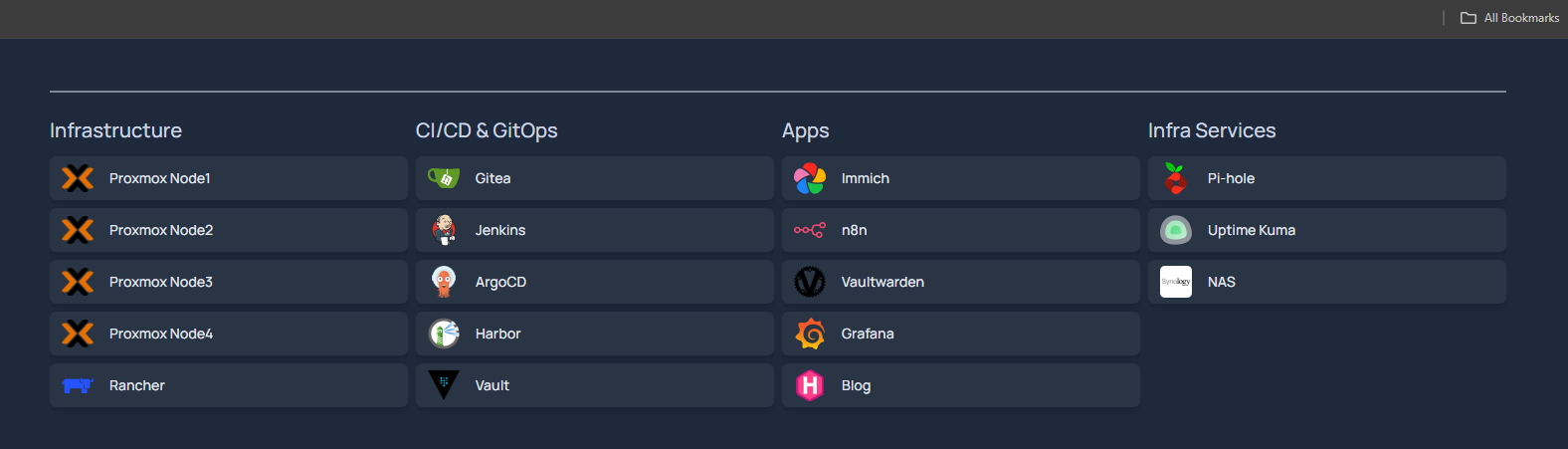
- Homepage — a self-hosted dashboard tying every service together in one place. Proxmox nodes, Rancher, the full CI/CD stack (Gitea, Jenkins, ArgoCD, Harbor, Vault), and every app (Immich, n8n, Vaultwarden, Grafana) now live behind a single pane of glass instead of scattered bookmarks.
Future (Phase 3):
- Migrate Genesis1 workloads to Exodus, then decommission the bare-metal cluster
- Ceph for shared, distributed storage — replacing local-lvm and removing the single-node storage ceiling that caused this phase’s real disk failures
- Uptime and health monitoring specifically for Rancher’s own management cluster and each downstream cluster’s agent connectivity, since this phase surfaced how easily that layer can silently degrade without anyone noticing until something visibly breaks
A small correction to an earlier assumption: I’d previously marked the Genesis1 → Exodus migration as complete. A live audit this weekend found that wasn’t quite true — the blog, Immich’s database, and Vaultwarden were still running on Genesis1 in parallel with their Exodus counterparts, meaning the old deployments were never actually torn down after the new ones came up. Not a crisis, just a reminder that “migration complete” needs to mean the old thing is actually gone, not just that the new thing works. That cleanup is now part of the Phase 3 queue, not something already behind me.
The Knowledge So Far
What three months taught:
On infrastructure: Hypervisor constraints are real. RAM pressure cascades. Monitoring matters. And when the infrastructure is genuinely running real workloads, real failures show up — a NIC driver bug, a DNS misconfiguration baked into a template, a disk that fills faster than expected. Root-causing those, not just restarting until it works, is the actual skill.
On architecture: Separating concerns (provisioning, configuration, orchestration) prevents mistakes. Tools only work well when they’re intentionally wired together.
On building: Build incrementally. Validate at each layer. Don’t wait for perfection. The 88% moment (RAM-constrained but operational) was as instructive as the stable moment — and so was every outage that followed it.
On infrastructure design: The lines between layers blur. Kubernetes scheduler sees hypervisor constraints. Hypervisor storage limits become application-level write failures. Understanding the whole stack, not just one layer, is what makes the debugging possible.